Implementing caching in an API function
This function implements caching for an API endpoint by checking the 'If-Modified-Since' header and returning a 304 status if the content has not been modified.
Implementation steps:
Server-Side (API): setHeader "Last-Modified" and check If-Modified-Since
Client-Side: Call the API as usual - do not turn caching off
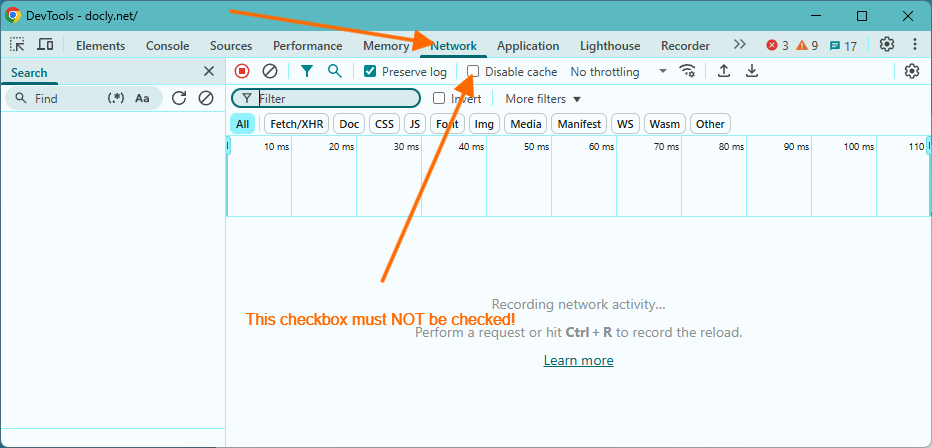
Testing: Make sure you haven't disabled caching in the developer toolbar
- Server-Side: setHeader "Last-Modified" and check If-Modified-Since
// #/API/test.js
export default () => {
    // Format the site's last modified date
    const formattedSiteModifiedDate = docly.format(request.sitemodified, "R");
    docly.setHeader("Last-Modified", formattedSiteModifiedDate);

    // Retrieve the 'If-Modified-Since' header from the request
    const ifModifiedSinceHeader = docly.getHeader("If-Modified-Since");

    let dateDifference;
    if (ifModifiedSinceHeader) {
        const ifModifiedSinceDate = new Date(ifModifiedSinceHeader);
        dateDifference = docly.dateDiff(ifModifiedSinceDate, request.sitemodified);

        // If the difference in seconds is less than 1, return 304 (Not Modified)
        if (dateDifference.TotalSeconds < 1) {
            return docly.setResultCode(304);
        }
    }

    // Return the response object (not cached)
    return {
        ifModified: ifModifiedSinceHeader,
        siteModified: formattedSiteModifiedDate,
        diff: dateDifference?.TotalSeconds
    };
} - Client-Side: Call the API as usual - do not turn caching off
The browser stores the response together with its Last-Modified header and sends it back as If-Modified-Since on the next request. When the function answers 304, the browser uses its stored copy. Both fetch and jQuery's $.get work this way by default. jQuery adds a cache-busting _={timestamp} parameter only when you set cache: false (or for the data types script and jsonp) - so do not set it.
Call the API as usual:
fetch("~/API/test")
    .then(r => r.json())
    .then(data => console.log("Data received:", data))
.catch(err => console.error("Request failed:", err)); - Testing: Make sure you haven't disabled caching in the developer toolbar
When testing API caching, ensure that the "Disable cache" option is not checked in your browser's developer toolbar. This setting is typically found under the "Network" tab.