
Using published folder search
Docly's built-in site search (a POST with __func=search) has been removed. It followed the Docly shares only, so a site with its own access rules could not stop it from returning hits the app hides.
Search is now an API endpoint in the site's own #/API folder, built on docly.getFiles with the search option. The endpoint below returns the same response structure as the old built-in search, so existing result rendering keeps working. If your site has its own rules for who may see what, check them per hit in allow().
The endpoint only returns documents the site actually serves as pages, and only the fields a result list needs - never the whole document.
API endpoint (#/API/Search.js)
Create #/API/Search.js in the site. It is served at ~/API/Search and takes q, page (0-indexed), pagesize (max 50) and an optional folder to limit the search to a sub folder. Files under the # folder are never returned, a data document without a display template is left out (it would be a 404 to open, so it must not be readable through the search either), and each hit carries only the fields listed in FIELDS.
// GET ~/API/Search?q=&page=&pagesize=&folder= - free text search for the site.
// folder (optional) limits the search to a sub folder.
// The response has the same shape as the old built-in search:
// { ResultCount, Items, Page, PageSize, PageCount, SiteUrl }.
// If your site has its own rules for who may see what, check them per hit in allow().
const MAX_QUERY = 200;
const MAX_PAGESIZE = 50;
function str(v) {
return v === null || v === undefined ? "" : "" + v;
}
function int(v, fallback) {
let n = parseInt(str(v), 10);
return isNaN(n) ? fallback : n;
}
// LastModified is a CLR date, not a string - sorting the string would sort on the culture
// format ("17.10.2026 ..."). getTime() exists on the date; Date.parse is the fallback.
function time(v) {
if (!v) return 0;
if (typeof v.getTime === "function") return v.getTime();
let t = Date.parse(str(v));
return isNaN(t) ? 0 : t;
}
// The # folder is the private part of the site - code, configuration, templates - and must
// never show up in a search.
function isPrivate(f) {
let p = str(f.filepath || f.Url).replace(/^\/+/, "");
return p.startsWith("#") || p.indexOf("/#") >= 0;
}
// Only what the site actually shows as a page may be a hit - the same rule the platform uses
// to serve a document. A data document without a display template (#/<Schema>.hash or .html)
// returns 404 when opened, and must not be readable through the search either.
// The template can also live in the schema itself (Templates with Publish = true). The schema
// is looked up in # and #/Schemas. If it lives elsewhere, the document is left out - one hit
// too few, never one too many.
let templates = {};
function publishesFromSchema(path) {
if (!docly.fileExists(path)) return false;
let s = docly.getFile(path);
return !!(s && s.Templates && Array.from(s.Templates).some(t => t && (t.Publish === true || ("" + t.Publish).toLowerCase() == "true")));
}
function hasTemplate(schema) {
if (templates[schema] === undefined) {
templates[schema] = !!(docly.fileExists("#/" + schema + ".hash") || docly.fileExists("#/" + schema + ".html") ||
["#/", "#/Schemas/"].some(dir => publishesFromSchema(dir + schema) || publishesFromSchema(dir + schema + ".docly")));
}
return templates[schema];
}
function isPage(f) {
let schema = str(f.fileschema);
if (!schema) return false;
// .hash/.html pages are Code File; other code files (.js, .css) and uploads are not pages.
if (schema == "Code File") return !/\.[A-Za-z0-9]+$/.test(str(f.filepath));
return hasTemplate(schema);
}
// The site's own access check per hit. Default: published pages outside #.
function allow(f) {
return !isPrivate(f) && isPage(f);
}
// Only the fields a result list needs go out - never the whole document. Add your own schemas'
// introduction fields here. Long texts are cut: a hit is a teaser, not the content.
const FIELDS = ["filename", "Title", "Url", "folderpath", "FormName", "LastModified", "CreatedTime",
"Introduction", "Description", "Summary", "Reference"];
const MAX_TEXT = 400;
// What getFiles loads: the output fields plus what allow() needs. Without a field list the whole
// document is loaded for every hit.
const FETCH = FIELDS.concat(["filepath", "fileschema"]);
function summary(f) {
let o = {};
for (let k of FIELDS) {
let v = f[k];
if (v === null || v === undefined) continue;
if (typeof v == "string" && v.length > MAX_TEXT) v = v.substring(0, MAX_TEXT);
o[k] = v;
}
return o;
}
// folder limits the search to a sub folder. Only a path down into the site: ".." and the
// system folder are rejected and give the whole site instead.
function scope(folder) {
let f = str(folder).replace(/\\/g, "/").replace(/^\/+|\/+$/g, "");
if (!f || f.split("/").some(p => p == ".." || p == "." || p.startsWith("#"))) return "/";
return "/" + f;
}
// File names are stored with HTML entities (":" for a colon), so decode before comparing.
const ENTITIES = { amp: "&", lt: "<", gt: ">", quot: "\"", apos: "'", nbsp: " " };
function decode(s) {
return str(s)
.replace(/&#(\d+);/g, (m, n) => String.fromCharCode(parseInt(n, 10)))
.replace(/&#x([0-9a-f]+);/gi, (m, n) => String.fromCharCode(parseInt(n, 16)))
.replace(/&([a-z]+);/gi, (m, n) => ENTITIES[n.toLowerCase()] !== undefined ? ENTITIES[n.toLowerCase()] : m);
}
function terms(q) {
return q.toLowerCase().split(/\s+/).filter(t => t.length > 0);
}
function titleOf(f) {
return decode(f.Title || f.filename).toLowerCase();
}
function textOf(f) {
return decode([f.Summary, f.Description, f.Introduction].filter(v => v).join(" ")).toLowerCase();
}
function isWordStart(s, i) {
return i == 0 || !/[a-z0-9]/.test(s.charAt(i - 1));
}
// getFiles does not rank. Whole title > title starts with the query > query as a word in the
// title > elsewhere in the title > all words in the title > words in the introduction > body only.
// Shorter titles win ties. Add a per-schema bonus here if some content should come first.
function score(f, lq, words) {
let title = titleOf(f);
let s = 0;
let i = title.indexOf(lq);
if (title == lq) s = 1000;
else if (i == 0) s = 600;
else if (i > 0 && isWordStart(title, i)) s = 400;
else if (i > 0) s = 300;
else if (words.length > 1) {
let n = words.filter(w => title.indexOf(w) >= 0).length;
s = n == words.length ? 200 : 100 * n / words.length;
}
if (s < 200) {
let text = textOf(f);
if (words.every(w => text.indexOf(w) >= 0)) s += 60;
}
return s - Math.min(title.length, 80) * 0.5;
}
export default function (q, page, pagesize, folder) {
q = str(q).trim();
if (q.length > MAX_QUERY) q = q.substring(0, MAX_QUERY);
page = Math.max(0, int(page, 0));
pagesize = Math.min(MAX_PAGESIZE, Math.max(1, int(pagesize, 10)));
let siteUrl = str(request.siteUrl);
if (!siteUrl.endsWith("/")) siteUrl += "/";
// Under two characters matches almost everything; answer empty instead of reading the site.
let hits = [];
let lq = q.toLowerCase();
let words = terms(q);
if (q.length >= 2) {
hits = (docly.getFiles(scope(folder), { recursive: true, search: q, fields: FETCH }) || []).filter(allow);
}
let scored = hits.map(f => ({ f: f, s: score(f, lq, words), t: time(f.LastModified) }));
scored.sort((a, b) => (b.s - a.s) || (b.t - a.t));
hits = scored.map(x => x.f);
return {
ResultCount: hits.length,
Items: hits.slice(page * pagesize, (page + 1) * pagesize).map(summary),
Page: page,
PageSize: pagesize,
PageCount: Math.ceil(hits.length / pagesize),
SiteUrl: siteUrl
};
}One call to docly.getFiles with the search option returns every matching document - there is no paging or limit in the engine - and the endpoint ranks the whole list before it pages it. The engine's time therefore grows with the number of hits: a specific query such as "getfile" takes well under 0.1 seconds, while a word found on almost every page ("docly" on this site, about 400 hits) takes around 2 seconds. Show a loading state in the UI and abort the previous request when the query changes, rather than showing a provisional result that is later replaced.
Calling it from jQuery (use ~/ so the call works when the site is published under a sub folder):
$.ajax({
    url: "~/API/Search",
    type: "GET",
    dataType: "json",
    data: { q: "<your search here>", page: 0, pagesize: 10 }, /* add folder: "articles" to search one sub folder */
    cache: false
}).then(function (response) {
    /* Enter code to show search result here */
    console.log(response);
}, function(xhr) {
    var err = xhr.responseJSON;
    if (err && err.Message) alert(err.Message); /* Display / handle error messages here */
});
This example writes the search response object (in this example called "response") to the developer toolbar (F12). See picture below:
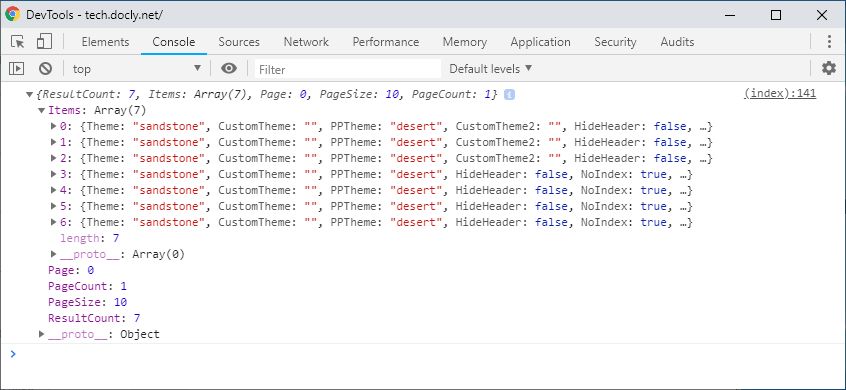
Response structure
{
    ResultCount: 12,     // total number of hits
    Items: [ ... ],      // the hits on this page
    Page: 0,
    PageSize: 10,
    PageCount: 2,
    SiteUrl: "https://www.mydomain.no/"
}
Items structure
Each item carries only the fields from the FIELDS list that the document actually has: filename, Title, Url, folderpath, FormName, LastModified, CreatedTime and the introduction fields (Introduction, Description, Summary, Reference), with long texts cut to 400 characters. Add a field to FIELDS when your result view needs it - never return the whole document. For every field a file object can have, see:
Complete example
<!--#master file="master.html" -->
<html lang="en">
<head>
    <title xdt:Transform="Replace">Search</title>
</head>
<body>
    <section id="Kontaktpersoner" xdt:Transform="Remove"></section>
    <section id="main" xdt:Transform="Replace">
		<!--#include file="Nav.hash" -->
        <article style="padding-bottom:10em">
            <form class="container main-container" id="Form1">
                <h1>Search in site:</h1>
                <input autofocus class="input-lg form-control" id="query" style="width:20em;display:inline-block" />
                <button type="submit" id="search" style="position:relative;top:-2px;padding-left:4em;padding-right:4em" class="btn btn-lg btn-default">Search</button>
            </form>
			<div class="container main-container" id="Resultat"></div>
		</article>
    </section>
    <div id="submitform" xdt:Transform="Replace">
        <script>
            $(function() {
                $("#Form1").off("submit");
                $("#Form1").on("submit", function() {
                    $("#Resultat").empty();

                    $.ajax({
                        url: "~/API/Search", /* the site's own search endpoint, see #/API/Search.js above */
                        type: "GET",
                        dataType: "json",
                        data: { q: $("#query").val(), page: 0, pagesize: 10 }, /* add folder: "articles" to search one sub folder */
                        cache: false
                    }).then(function (response) {
						$.each(response.Items, function() {
							// Build the elements and set the text with .text() — file names are user content,
							// and concatenating them into HTML would let a crafted name inject script (XSS).
							var $link = $("<a>").attr("href", this.Url).text(this.filename + " (" + this.FormName + ")");
							$("#Resultat").append($("<div>").append($link));
						});
						if (response.ResultCount === 0)
						{
						    $("#Resultat").text("No results.");
						}
                    }, function(xhr) {
						var err = xhr.responseJSON;
						$("#Resultat").text(err && err.Message ? err.Message : "Search failed");
					});
                    return false;
                });
            });
        </script>
    </div>
</body>
</html>