Load data from Excel (XLSX)
Example of how to load data from an Excel file and use it in your site.
loadExcel(filename, column, row, sheet)
Loads data from excel file. The table must start with a header row: row 1 by default, or the row given by row. Each header cell becomes a property name, and every row below it becomes one object.
Parameter | Type | Required | Description |
|---|---|---|---|
filename | string (filepath) | yes | Absolute file path for Excel file (XLSX) to load data from. |
column | number | no | Column number of the first header cell (counting from 1). The data rows are read from the same column. |
row | number | no | Row number of the header row (counting from 1). The data rows start on the row below it. |
sheet | number | no | Sheet number (counting from 1) |
Example loading data to HTML-page
This example code loads data from an Excel file. The cell values are written with docly.htmlEncode(), because hash expressions do not escape HTML:
<h1>Product list</h1>
<table>
    <thead>
    <tr>
        <td>Number</td>
        <td>Name</td>
        <td>Price</td>
    </tr>
    </thead>
    <tbody>
    #var xlsx = docly.loadExcel("Test files/Example file.xlsx")#
    #for(var row of xlsx) {#
    <tr>
        <td>#docly.htmlEncode(row.Number)#</td>
        <td>#docly.htmlEncode(row.Name)#</td>
        <td>#format(row.Price, "N")#</td>
    </tr>
    #}#
</tbody>
</table>
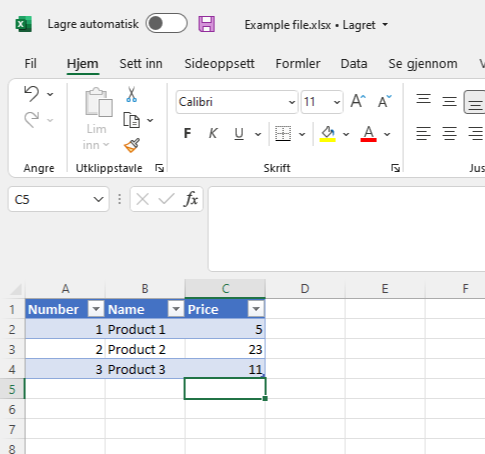
Contents of Excel (Example file.xlsx) file: